Documentation Builder Script
Create and organize project documentation, FAQs, and how-to guides in one centralized, self-hosted knowledge base so your team can find consistent instructions and reference material when they need it.
- Single-Domain License
- Admin-Managed Documents & FAQs
- Free Installation Included
What Is the Documentation Builder Script?
Documentation Builder Script is a self-hosted PHP application for creating and maintaining a central set of project documents and FAQs for your team.
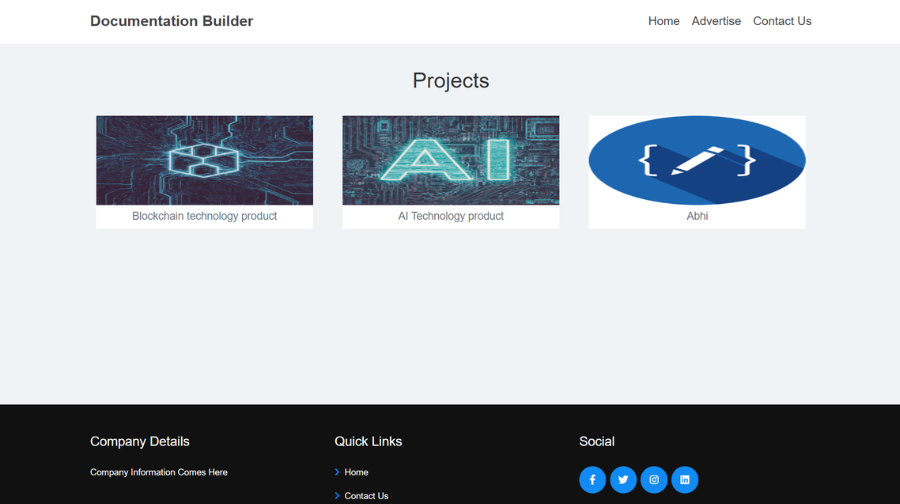
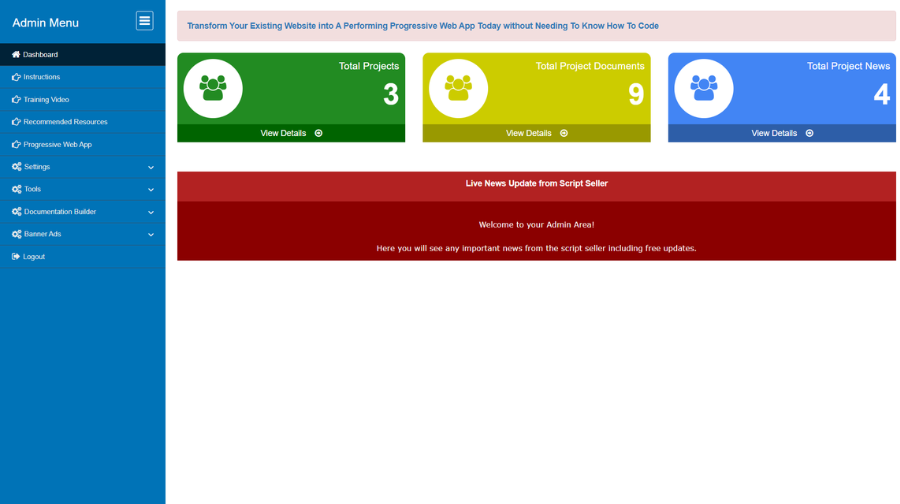
An administrator can create and manage projects, add or update documentation, and maintain FAQs through the administration area. Team members can then browse the published information instead of relying on scattered notes, repeated messages or disconnected files.
The current product listing describes rich-text editing and support for including images, videos and links inside documentation. Its responsive interface is designed for access from desktops, tablets and smartphones.
Typical content includes standard operating procedures, technical notes, project instructions, internal how-to guides, reference material and frequently asked questions.
Scope note: This product focuses on organizing and presenting documentation. It should not be treated as a task assignment, ticketing or workflow automation system unless the exact capability is documented separately.
How Documentation Builder Works
1. Create a Project
Use the administration area to add a project that needs its own documentation and reference material.
2. Add Documents
Create, edit or remove documents so the team can refer to current instructions and project information.
3. Format the Content
Use the rich-text editor to structure explanations and make documentation easier to read.
4. Maintain FAQs and Media
Keep frequently asked questions up to date and include supported images, videos and links where useful.
5. Share a Central Reference
Let team members navigate the published documentation from a responsive interface whenever they need it.
Key Features
Project Management
Create, edit and delete projects from the administrator interface as your documentation needs change.
Document Management
Add, revise and remove documents in the shared knowledge base.
FAQ Management
Maintain frequently asked questions so the team can find consistent answers to recurring questions.
Rich-Text Formatting
Format documentation with the editor instead of presenting every page as unstructured plain text.
Images, Videos and Links
Include supported media and useful references to explain a process or provide additional context.
Responsive Presentation
Read documentation on desktop, tablet and mobile screen sizes through the responsive interface.
Centralized Knowledge
Keep core project information in one place rather than scattering instructions across documents and messages.
Team Reference Material
Use the published material to help the team follow shared procedures and understand project-specific information.
Administration Controls
Keep project content, documents and FAQs maintained through the administration area.
Multiple Documentation Types
Use the platform for technical manuals, user guides, internal procedures, project notes and reports.
Self-Hosted PHP Script
Install the software on compatible hosting and operate the documentation site under your own domain.
Simple Knowledge-Building Workflow
Start with important instructions and expand or revise the material as projects and team needs evolve.
Who Can Use Documentation Builder?
Small Business Teams
Maintain shared operating instructions, policies and internal reference pages.
Project Managers
Collect project-specific guides, implementation notes and reference documents in one place.
Operations Teams
Document repeatable procedures, checklists and routine working practices for staff to consult.
Technical Teams
Organize technical explanations, setup notes, troubleshooting steps and links to related resources.
Agencies and Consultants
Prepare documentation sets for internal delivery processes and project reference material.
Support and Training Teams
Maintain FAQs and how-to articles that help answer common questions consistently.
Practical Documentation Use Cases
Standard Operating Procedures
Record the steps that staff should follow for recurring processes.
Employee Onboarding Guides
Collect key instructions, reference links and frequently asked questions for new team members.
Project Handover Notes
Keep project context, decisions and key references together for handovers.
Internal Knowledge Base
Give staff one place to look for documented answers rather than relying on repeated messages.
Technical Documentation
Write setup guides, implementation notes and technical manuals with supporting media and links.
Frequently Asked Questions
Keep common questions and answers organized so people can find consistent information.
Security, Privacy & Responsible Operation
As a self-hosted documentation site, the information you publish is managed within your own hosting environment. Use HTTPS, unique administrator credentials, restricted admin access and maintained server software. Replace any default or demonstration credentials before a production launch.
Installation & Support
For a limited time, we will install this script for you absolutely FREE!
Frequently Asked Questions
Documentation Builder Script is a self-hosted PHP application for creating and managing project documentation, documents and FAQs from an administration area, then presenting that information in a navigable website for your team.
It can suit small businesses, project teams, agencies, operations groups and support teams that need a shared place for internal guides, procedures, project notes, technical manuals or frequently asked questions.
The product listing describes project management controls that let the administrator create, edit and delete projects. Review the live demo to confirm the organization and navigation options for your intended setup.
Yes. The product listing describes administration controls for adding, editing and removing documents and FAQs, with a rich-text editor for formatting content.
Yes. The product page lists a rich-text editor so the administrator can format documentation content rather than publishing plain text only.
The product listing describes support for embedding images, videos and links within articles, allowing the documentation to include supporting media and references.
The listed interface is responsive and is intended to be accessible on desktops, tablets and smartphones. Check the live demo on the devices and screen sizes important to your team.
Its documented purpose is to create and organize documentation, project information and FAQs for a team. It should not be treated as a task assignment, ticketing or automated workflow engine unless a separate verified feature specifically provides that capability.
It is sold as a PHP script for installation on your own compatible hosting account. You manage the server, deployment, access policies, backups and ongoing operation.
The current product listing specifies a Unix/Linux server, PHP 8.2 or higher, MySQL database support, ionCube Loader, GD Library and cURL. Confirm the requirements against the package instructions and your host before installation.
The current listing offers a single-domain license. Its terms prohibit using the same license on more than one domain and prohibit reselling or leasing the script.
The current product comes with free installation.
Why Buy From YourFreeWorld?
We build and operate web platforms ourselves, including content, membership, ecommerce and directory-oriented projects. Our script catalog focuses on practical self-hosted PHP software that customers can use as a foundation for their own websites and online businesses.
We aim to describe what each product actually includes, provide technical information and show the software through real screenshots and demonstrations so buyers can make an informed decision.
Developed By
Developed by: Rohit Seth, Lead PHP Architect
Expert in secure, high-scale PHP marketing frameworks since 2003.
Verified Architect — Rohit Seth (22+ Years Experience)