Knowledgebase Management System
Create a central knowledge base where members can find predefined information, instructions and answers about how your website works. Organize content into categories and make it easier for users to find useful guidance.
- Free Installation Included
- Live demo access
- Single-domain script license
What Is the Knowledgebase Management System?
The Knowledgebase Management System Script helps you create a central information area for your website. Administrators can publish predefined explanations, instructions, FAQs and other useful content so members can learn how the site works without relying only on direct support.
Use categories to group related information, then maintain the content as your website, services or member processes change. A well-organized knowledge base gives users a place to begin when they have questions about accounts, features, rules, onboarding or common tasks.
The published product description lists content management, category organization, a rich text editor, search, responsive access and support for adding images, videos and links to articles.
Practical note: The script provides the publishing structure; the usefulness of the knowledge base depends on your team writing accurate, clear, current information and reviewing it as your site changes.
How to Use a Website Knowledge Base
Plan the Main Topics
List the questions members regularly ask about your website, services, account setup and important processes.
Create Categories
Group related topics into understandable categories so members can browse information in a logical order.
Add Predefined Information
Use the admin area to create or edit FAQs, instructions and supporting documents. Keep explanations specific and easy to follow.
Improve Readability
Use clear headings, concise paragraphs and relevant images, videos or links where they help explain a task.
Create Your Website Knowledge Base
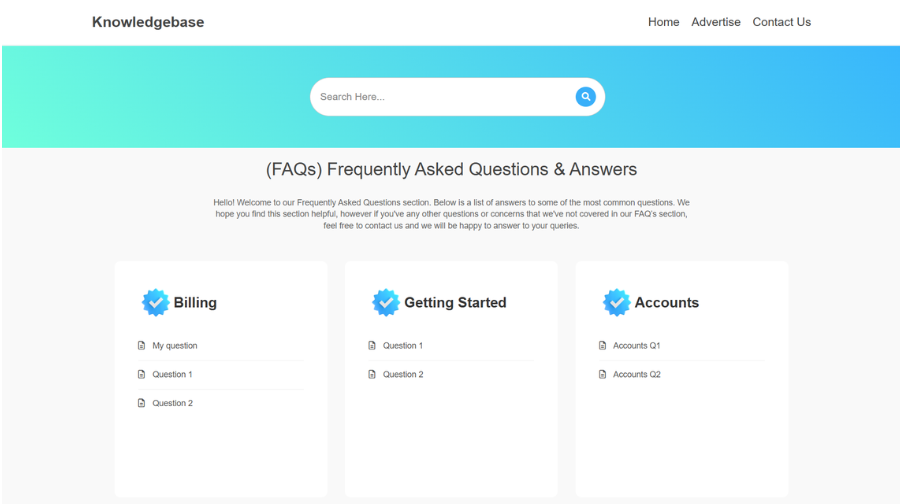
Give users a clear route to browse categories and use the listed search functionality to locate relevant information.
Review and Update
Review important articles whenever your website changes. Remove outdated instructions and verify links before publishing updates.
Key Features
Admin Content Management
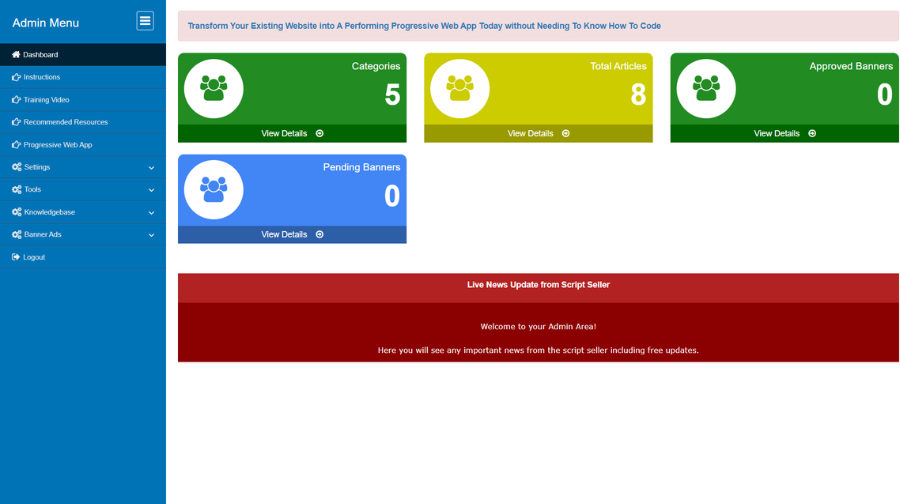
Add, edit or remove knowledge-base information and FAQs through the administration area.
Category Management
Organize information into categories so visitors can navigate related topics more easily.
Rich Text Content
Format article content for improved readability using the rich text editor described on the product page.
Keyword Search
Help users locate relevant answers using the script's listed search functionality.
Responsive Interface
Provide access to knowledge-base information from desktop computers, tablets and smartphones.
Images, Videos & Links
Add visual explanations and supporting links to help members understand instructions.
Predefined Site Guidance
Explain how your website works, how to use its features and where members can find essential information.
Expandable Content Library
Add more categories and information as your website, services and member questions evolve.
Optional YourFreeWorld Service Add-Ons
If you want to extend the value of your website beyond the core ecommerce functionality, selected YourFreeWorld services can be connected through pre-integrated modules. These services can be used to add marketing, engagement, digital-product and communication capabilities to your business.
Contest Add-On
Incentivize your website with contests designed to encourage participation, increase traffic flow and give you a way to promote contests and prizes to your members.
Email Validation Service Add-On
Validate email addresses submitted by members joining your website so you can maintain cleaner member records and improve the quality of your customer communication.
Push Notifications Service Add-On
Stay connected with customers through push notifications for supported mobile and desktop environments, helping you reach audiences when you have updates or offers to communicate.
Feedback Surveys Add-On
Create customizable exit surveys and feedback sections to collect visitor input and use customer feedback to improve your website, products and sales process.
List Management Service Add-On
Use lead-capture pages, splash page templates and custom templates while managing member lists and email communication through a service designed to reduce the mailing workload on your own server.
Mobile App Building Add-On
Extend your online business with a custom mobile application using our mobile app building service, providing another way for customers to access and interact with your services.
Who Can Use This Knowledgebase Script?
Membership Websites
Explain membership rules, account navigation, available features and how to get started.
Online Services
Publish step-by-step instructions and service information for customers and members.
Digital Product Sites
Provide guidance about accessing products, using features and finding common answers.
Communities & Portals
Centralize community guidelines, participation instructions and frequently needed information.
Small Businesses
Build a straightforward self-service information area for common customer questions.
Website Owners
Keep key site instructions in one organized place instead of scattering them across unrelated pages.
Security, Privacy & Content Governance
Before launch, use HTTPS, secure administrator credentials, keep the hosting environment maintained and restrict access to the administration area appropriately. Avoid placing passwords, private member information or other sensitive data in public knowledge-base articles.
Assign responsibility for reviewing articles. When website processes, pricing, policies or features change, update related guidance so members are not directed to outdated steps. If you publish policy or legal information, have the relevant person review it before publication.
Installation & Support
For a limited time, we will install this script for you absolutely FREE!
Frequently Asked Questions
It is a PHP script for creating a website knowledge base where administrators can publish predefined information, guides and answers to help members understand how the site works.
The listed price is $49 for a single-domain license.
Yes. The current product allows category management so information and FAQs can be organized into sections that are easier for users to browse.
Yes. The current product comes with administration tools for adding, editing and removing FAQs or documents, including content formatting with a rich text editor.
The current product contains search functionality that helps users locate relevant information using keywords or phrases.
The current product allows to include images, videos and links. Confirm supported formats and behavior in the demo before publishing specialized content.
The current product comes with a responsive interface intended for desktop, tablet and smartphone access.
You can publish predefined instructions about how your website works, account guidance, service explanations, common questions, policies and other information your members need. Keep content accurate and appropriate for your site.
The current product requires a Unix/Linux server, PHP 8.2 or higher, MySQL database support, ionCube Loader, GD Library and cURL.
No. The published terms specify one license for one domain. The script must not be resold or leased.
It can help users find answers to common questions, but the outcome depends on the quality, completeness, visibility and maintenance of the content. It does not guarantee fewer support requests.
The current product comes with a free installation.
Why Buy From YourFreeWorld?
We build and operate web platforms ourselves, including content, membership, ecommerce and directory-oriented projects. Our script catalog focuses on practical self-hosted PHP software that customers can use as a foundation for their own websites and online businesses.
We aim to describe what each product actually includes, provide technical information and show the software through real screenshots and demonstrations so buyers can make an informed decision.
Developed By
Developed by: Rohit Seth, Lead PHP Architect
Expert in secure, high-scale PHP marketing frameworks since 2003.
Verified Architect — Rohit Seth (22+ Years Experience)